Training built around how
assistants actually work
You're the person who keeps everything running. AI and Microsoft 365 are changing what that job looks like,
and there's a path here that fits however you learn best.
The workplace has changed: have your skills kept up?
AI tools like Microsoft Copilot aren't coming: they're already here. Assistants who master them are getting promoted, taking on more strategic work, and reclaiming hours of their time each week. The reality:
- Your executives expect you to know how to use AI and Copilot
- You're spending hours on tasks Copilot could handle in minutes
- Self-teaching through Google and YouTube leaves gaps in your knowledge
- You want to work smarter, but you're not sure where to start
- You need practical, assistant-focused training - not generic tech courses
The solution: expert-led training designed specifically for assistants, showing you exactly how to use Copilot and Microsoft 365 to work faster, smarter, and more confidently.
Pick the training that fits your needs
Most Popular
Microsoft 365 with Copilot - The Human Advantage
The full transformation. Four live weekly sessions covering Word, Excel, PowerPoint, Outlook and Teams with Copilot plus the judgement to use it well.
Cohort 5 starts 2 November.
Early Bird £297 (ends 19 October) - Standard £397
90 minute webinar
Excel with Copilot
See what Copilot can actually do in Excel, in a focused 90-minute session.
Next webinar scheduled for October 6th
Investment of just £97
ONE-TO-ONE
Expert Focus Session
Sometimes you need focused, personal attention to tackle a specific challenge or skill gap. Bring your real-world problems — we'll work through them together with solutions you can use straight away.
90 min: £350 · a specific challenge
2 hr: £450 · multiple issues or deeper dives
3 hr: £650 · major projects
SELF-PACED
Course Library
Prefer to learn on your own schedule? Bite-sized video lessons across Word, Excel, PowerPoint, Outlook, Teams and more — learn at your own pace, on your own time.
Individual courses from £97 · Complete library £999
Not sure which path is right for you?
Short on time — start with the Excel webinar. Ready for a full transformation — join the live cohort. Need something built entirely around your specific role — book a Maestro Session. Want to learn whenever suits you — browse the library.
Learn from an expert who understands assistants
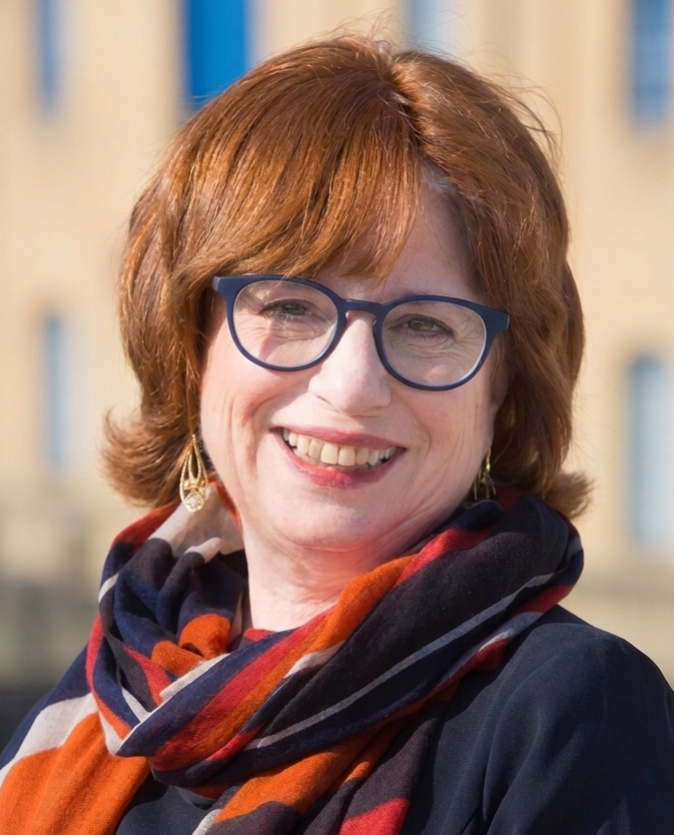
Shelley Fishel has trained assistants for over 25 years. She's authored 48 books on Microsoft Office (2.5 million copies sold worldwide) and is a Certified Learning Facilitator and Fellow of the Learning & Performance Institute.
✓ Designed specifically for assistants ✓ Practical, not theoretical
✓ Expert but approachable ✓ Proven results
What EAs, PAs, and VAs Are Saying
"This course has benefitted me enormously in becoming the go to person for all things AI with colleagues. I've learnt an awful lot across these four sessions with Shelley on Microsoft 365."
Elizabeth Bate
"The learnings from this course will enable me to work smarter and more efficiently, and hopefully give me back time to concentrate on other areas of work."
Shirley Jordan
"I've been using Copilot for a year, but this session has been very helpful! Shelley is fantastic!"
Eva, UCL
"Not only was Shelley's course extremely useful, but it's proving extremely valuable, with a very high rate of return on my investment in both time and cost. Turning to Copilot as a starting point has enabled more sophisticated, more effective spreadsheets to be created more quickly, for me and for my clients, and that has impacted my revenue in a positive way."
Colin Foster
Managing Director, Universal Solutions 4 Business
Frequently Asked Questions
Do I need Copilot to take Microsoft 365 with Copilot - The Human Advantage?
It's recommended for the full hands-on experience, but you'll still gain valuable AI concepts and Microsoft 365 skills without it.
What if I'm a complete beginner with AI?
Perfect! The training is designed to meet you where you are. Beginners gain foundational skills while more experienced users discover advanced techniques they didn't know were possible.
Are the sessions recorded?
Yes! All live training sessions are recorded and you get lifetime access to the recordings.
Can I get a certificate?
Yes! You receive a certificate of completion for the course.
What if I can't attend a live session?
No problem! You can watch the recording and still participate in the community and ask questions.
Can my organization pay for my training?
Absolutely! Many assistants have their training funded by their employers. We can provide invoices and any documentation needed. If your organization wants to train multiple assistants, check out our Organizations page.
What's your refund policy?
Once you attend an online course and have access to the recording there is no refund.
What's the difference between the live cohort and a Maestro Session?
The live cohort is a structured 4-week programme covering the full Microsoft 365 and Copilot toolkit alongside other assistants. A Maestro Session is one-to-one time built entirely around your specific challenge: no set curriculum, just focused problem-solving with Shelley.